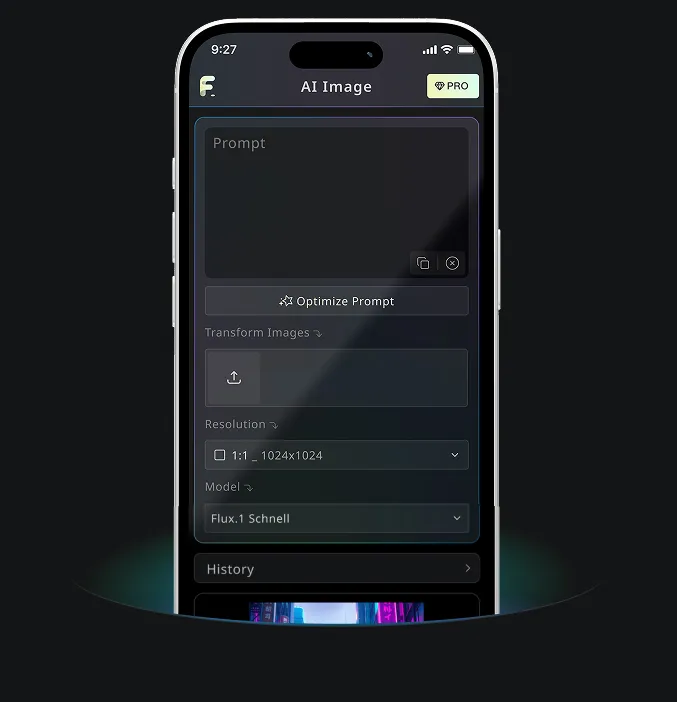
Trình tạo văn bản thành ảnh miễn phí bởi Hailuo AI Image Generator
Hỗ trợ các định dạng: JPEG, JPG, WEBP, PNG
Dùng thử miễn phí tạo ảnh chất lượng cao
Trải nghiệm tạo ảnh nhanh hơn, chất lượng cao hơn, không quảng cáo trên website chuyên nghiệp của chúng tôi
API hình ảnh ổn định, tiết kiệm chi phí được đề xuất
Chuyển từ thử nghiệm ảnh miễn phí sang vận hành ổn định với năm API hình ảnh của FLAQ AI. So sánh các mô hình ổn định, hợp túi tiền cho tác vụ tạo, chỉnh sửa, khối lượng lớn và quy trình sáng tạo sẵn sàng cho sản phẩm.
GPT Image 2 API
Bám sát câu lệnh, hiển thị chữ rõ trong ảnh, kiểm soát chất lượng linh hoạt và tạo hoặc chỉnh sửa đáng tin cậy cho quy trình sản xuất.
Xem APINano Banana Pro API
Hiểu ngữ nghĩa nhờ Gemini, cho kết quả có độ trung thực cao và hỗ trợ linh hoạt tạo ảnh từ văn bản hoặc chỉnh sửa ảnh cho ứng dụng chuyên sâu.
Xem APISeedream 5.0 Pro API
Tạo ảnh từ văn bản chuyên nghiệp với bố cục cảnh phức tạp, tỷ lệ khung hình linh hoạt và phong cách hình ảnh thương mại chỉn chu.
Xem APIQwen Image 2.0 API
Mô hình hình ảnh tiết kiệm chi phí của Alibaba, hỗ trợ câu lệnh đa ngôn ngữ, kiểm soát độ phân giải linh hoạt và quy trình tạo ảnh dễ mở rộng.
Xem APIZ Image API
Dịch vụ tạo ảnh từ văn bản được quản lý với chi phí hợp lý cho hình ảnh sản phẩm, tài liệu tiếp thị, nội dung mạng xã hội và tự động hóa sáng tạo quy mô lớn.
Xem APIVí dụ văn bản thành ảnh từ Hailuo AI Image Generator
Xem cách Free Text to Image Generator biến ý tưởng viết thành hình ảnh có thể sử dụng, từ bản nháp concept nhanh đến hình ảnh chi tiết cho quy trình sáng tạo và nội dung.
Tạo ảnh nhanh

Create a clean 1:1 automotive design specification board on a light gray studio background. Feature a highly detailed 1980s Volvo 240 widebody show car, JUMDOO EDITION, in warm beige satin paint with satin black accents. The car should have a boxy Volvo 240 silhouette, very low air-suspension stance, extra-wide track width, riveted wide fender flares, deep black front splitter with near-ground clearance, black side skirts, black lower cladding, black deep-dish multi-spoke wheels, stretched low-profile tires, black grille with Volvo diagonal slash, one inner front headlight covered by an X-pattern insert for an asymmetric look, shaved clean body trim, dual center exhaust, and visible racing bucket seats. Add small JUMDOO branding on the front plate area, side skirt, and rear panel. Arrange six studio render views in a 3x2 grid: front 3/4, front, side profile, rear, rear close view, and rear 3/4. Use crisp realistic 3D product-render lighting, soft shadows, black sans-serif typography, thin gray divider lines, and minimal Swiss-style layout. Include a top-left title: VOLVO 240 WIDEBODY, subheadline: JUMDOO EDITION. Add small side panels for material swatches, colorway, branding locations, wheels and fitment, and notable details.

Create a high-end minimalist Keynote-style presentation cover slide with the aesthetic of Apple's industrial design. Use a 16:9 widescreen layout. The background should have a dark matte black on the upper half and a light concrete gray platform occupying one quarter of the bottom of the screen. Place a large, realistic floating rectangular panel in the center foreground on the right side. The panel should resemble a thin black glass device or a polished obsidian platform with mirror reflection, chamfered chrome metal edges, and precise industrial finish. The panel should be suspended above the light surface and cast a soft elongated shadow below it. Add a tall vertical gray metal wall or pillar on the rightmost edge for composition. Adopt extremely simple high-end artistic guidance, leaving a lot of negative space, using film studio lighting, subtle gradients, and a clear contrast between black and silver materials. On the left side, set a clean white sans-serif font and maintain clear hierarchy: a row of tiny titles " {argument name="system label" default="Apple-inspired presentation system"} ", a row of very large bold titles " {argument name="headline text" default="Clarity At Scale"} ", and a row of medium-sized subheadings " {argument name="subtitle text" default="The strongest slides behave like products." } ". Below it, include 3 numbered principles in a vertical list with dotted lines and fine spacing: "01 | {argument name="principle 1" default="One focal object"}", "02 | Binary light / dark rhythm", and "03 | Blue only for signal". Add a short thin horizontal line above the list and a tiny blue emphasis line below it. Draw a very thin horizontal guide line running through most of the slides near the top and label the page number "01" in the upper right corner. Repeat the small title "Apple-inspired presentation system" on the light-colored surface at the bottom left. The overall appearance: luxurious technology presentation, professional product launch slides, ultra-clean Swiss grid layout, restrained single-color palette (with a subtle blue accent), and realistic rendering effects integrated into the presentation design.

Create a character growth chart based on this image. [Current Character Information] - Name: {argument name="name" default="Brankide"} - Age: {argument name="age" default="5492 years old"} - Height: {argument name="height" default="207cm"} - Occupation: {argument name="job" default="Elven Battle Commander"} - Personality: {argument name="personality" default="Cold"} Mark the height scale at the edge. Create a natural growth process, dividing it chronologically into 5 years old, early adolescence, late adolescence, twenties, and current age. Display the full body image and clearly show the height differences.
Tính năng văn bản thành ảnh của Hailuo AI Image Generator
Free Text to Image Generator diễn giải prompt, ghi chú phong cách, chi tiết bối cảnh và hướng sáng tạo để tạo ảnh AI rõ nét online. Không cần nền tảng thiết kế hay thiết lập phức tạp.
Phân tích văn bản thông minh & tạo hình ảnh
Công cụ đọc chủ thể, bối cảnh, cảm xúc, phong cách, hành động và chi tiết của bạn, rồi chuyển văn bản đó thành kết quả hình ảnh khớp với ý định.
Tạo ảnh hỗ trợ nhiều mô hình
Hỗ trợ tạo ảnh theo prompt cho nhiều phong cách, từ minh họa và concept art đến cảnh hiện thực, hình ảnh sản phẩm và bài đăng mạng xã hội.
Tạo tức thì & trải nghiệm miễn phí
Nhập prompt văn bản và nhấn nút tạo. Công cụ tạo ảnh trong vài giây mà không cần đăng ký, không hàng đợi chờ và không thiết lập phức tạp.
Có thể chỉnh sửa & bảo vệ quyền riêng tư
Tải ảnh hoàn thiện xuống, tạo thêm biến thể hoặc tinh chỉnh prompt để thử lại, đồng thời giữ quy trình đơn giản và tôn trọng quyền riêng tư.
Ứng dụng văn bản thành ảnh của Hailuo AI Image Generator
Free Text to Image Generator hỗ trợ nghệ thuật số, tài sản ecommerce, bài đăng social, hình ảnh thương hiệu và tài liệu giáo dục. Biến văn bản đơn giản thành hình ảnh khi bạn cần concept, bản nháp hoặc ý tưởng thị giác có thể đăng tải một cách nhanh chóng.
Nghệ thuật số & thiết kế concept
Nghệ sĩ và nhà thiết kế có thể phác thảo minh họa, concept art, mood image và nghiên cứu thị giác từ mô tả văn bản đơn giản.
Thương mại điện tử & tạo tài sản quảng cáo
Các đội marketing và ecommerce có thể biến mô tả sản phẩm hoặc ý tưởng chiến dịch thành concept hình ảnh, đồ họa quảng bá và bản nháp sẵn sàng cho quảng cáo.
Mạng xã hội & vận hành nội dung
Các đội social có thể tạo ảnh bài đăng, ảnh bìa, minh họa theo chủ đề và hình ảnh chiến dịch để nội dung nổi bật giữa dòng tin đông đúc.
Hỗ trợ giáo dục & thuyết trình
Giáo viên, người thuyết trình và nhà sáng tạo có thể chuyển ý tưởng bài giảng hoặc khái niệm trừu tượng thành hình ảnh minh họa để giao tiếp rõ ràng hơn.
Cách dùng trình tạo văn bản thành ảnh Hailuo AI Image Generator
Mô tả ý tưởng, tạo ảnh và tinh chỉnh kết quả trong một quy trình text-to-image đơn giản.
Nhập prompt của bạn
Viết điều bạn muốn thấy, bao gồm chủ thể, bối cảnh, phong cách, ánh sáng, màu sắc hoặc cảm xúc.
Nhấn tạo
Chọn tỷ lệ đầu ra (nếu có), rồi nhấn Generate để AI biến prompt của bạn thành ảnh.
Tải xuống hoặc tạo thêm
Lưu ảnh hoàn thiện, điều chỉnh prompt hoặc tạo thêm các phiên bản từ cùng một ý tưởng.
Ứng dụng Hailuo AI Image Generator cho GPT Image 2 và tạo ảnh AI
Dùng Hailuo AI Image Generator để tạo ảnh AI với GPT Image 2 miễn phí online, rồi tiếp tục quy trình trên desktop hoặc mobile.