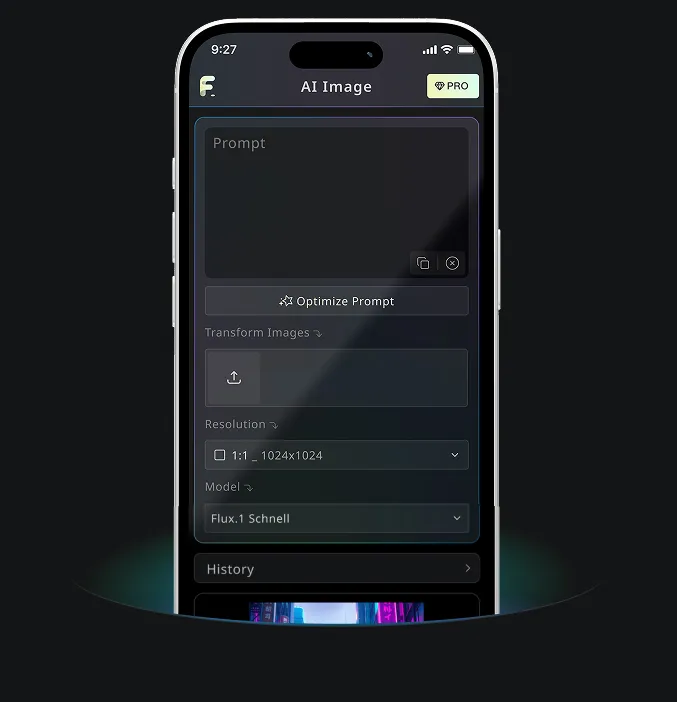
โปรแกรมแก้ไขรูปภาพฟรี - Hailuo AI Image Generator
ทดลองใช้ฟรีสำหรับสร้างภาพคุณภาพสูง
สัมผัสประสบการณ์สร้างภาพที่เร็วขึ้น คุณภาพดีกว่า และไม่มีโฆษณาผ่านเว็บไซต์มืออาชีพของเรา
API ภาพที่เสถียรและคุ้มค่าที่เราแนะนำ
ยกระดับจากการทดลองสร้างภาพฟรีสู่ระบบโปรดักชันที่เชื่อถือได้ด้วย API ภาพ 5 รายการจาก FLAQ AI เปรียบเทียบโมเดลที่เสถียรและคุ้มค่าสำหรับการสร้าง แก้ไข งานปริมาณมาก และเวิร์กโฟลว์เชิงพาณิชย์
GPT Image 2 API
ทำตามพรอมต์ได้แม่นยำ สร้างข้อความในภาพได้ชัดเจน ปรับคุณภาพได้ยืดหยุ่น และสร้างหรือแก้ไขภาพสำหรับงานโปรดักชันได้อย่างเชื่อถือได้
ดู APINano Banana Pro API
เข้าใจความหมายด้วย Gemini ให้ภาพความละเอียดสูง และรองรับทั้งการสร้างจากข้อความและแก้ไขภาพสำหรับแอปพลิเคชันที่ซับซ้อน
ดู APISeedream 5.0 Pro API
สร้างภาพจากข้อความระดับมืออาชีพ จัดองค์ประกอบฉากซับซ้อนได้ รองรับหลายอัตราส่วน และให้สไตล์เชิงพาณิชย์ที่สวยงาม
ดู APIQwen Image 2.0 API
โมเดลภาพจาก Alibaba ที่คุ้มค่า เข้าใจพรอมต์หลายภาษา ควบคุมความละเอียดได้ยืดหยุ่น และรองรับงานสร้างภาพที่ขยายขนาดได้
ดู APIZ Image API
บริการสร้างภาพจากข้อความราคาคุ้มค่าสำหรับภาพสินค้า สื่อการตลาด คอนเทนต์โซเชียล และระบบสร้างสรรค์อัตโนมัติปริมาณมาก
ดู APIตัวอย่างโปรแกรมแก้ไขรูปภาพฟรี
ดูว่า Free Image to Image AI เปลี่ยนภาพอ้างอิงที่อัปโหลดให้เป็นภาพใหม่ เวอร์ชันสไตล์ต่างๆ และการแก้ไขภาพแบบละเอียดได้อย่างไร ภายใต้เวิร์กโฟลว์บนเบราว์เซอร์ที่รวดเร็ว
สร้างภาพอย่างรวดเร็ว

Turn this reference into a premium editorial product image with clean lighting, polished composition, and no extra text.

Edit the uploaded image into a cinematic design concept while preserving the main subject, improving lighting, and adding a refined modern style.
แปลงสไตล์

Create a polished social media portrait from this image with soft cinematic light, clean background separation, and realistic detail.

Design a modern logo inspired by the uploaded product and place it naturally in the center of the image.

Create a brand mood board from the edited image, with a cohesive premium visual style and multiple design directions.
ผลลัพธ์คุณภาพสูง

Transform this image into a poster-style creative visual with dramatic lighting, rich detail, and a professional campaign look.

Create a clean character or product design sheet from the reference image, with consistent style and presentation.
ฟีเจอร์โปรแกรมแก้ไขรูปภาพฟรี
Free Image-to-Image AI อ่านหัวข้อ องค์ประกอบ สี และสไตล์จากภาพต้นฉบับของคุณ แล้วสร้างผลลัพธ์ใหม่ที่ยังคงประโยชน์ของภาพอ้างอิงไว้ พร้อมมอบทิศทางภาพที่สดใหม่ ไม่ต้องตั้งค่าซับซ้อน
การวิเคราะห์เนื้อหาในภาพอัตโนมัติ
AI ตรวจจับหัวข้อ ฉาก องค์ประกอบ ความสัมพันธ์ของสี และสไตล์ภาพ จากนั้นใช้รายละเอียดเหล่านั้นเป็นแนวทางเพื่อสร้างผลลัพธ์ภาพใหม่
การสร้างภาพที่ขับเคลื่อนด้วยหลายโมเดล
ผสานภาพที่อัปโหลดกับพรอมต์ข้อความเพื่อควบคุมการเปลี่ยนสไตล์ การแก้ไขวัตถุ การอัปเดตฉากหลัง และการตีความเชิงสร้างสรรค์ใหม่
สร้างได้ทันทีและใช้ฟรี
อัปโหลดภาพต้นฉบับแล้วเริ่มสร้างได้ทันที เวิร์กโฟลว์แบบ image-to-image รวดเร็ว เรียบง่าย และออกแบบมาเพื่อการปรับแก้แบบวนซ้ำอย่างไว
แก้ไขได้และปลอดภัย
บันทึกผลลัพธ์ สร้างใหม่เป็นเวอร์ชันอื่น หรือใช้ภาพที่ได้เป็นภาพอ้างอิงใหม่ เวิร์กโฟลว์ถูกออกแบบมาเพื่อการวนซ้ำอย่างรวดเร็ว พร้อมดูแลเนื้อหาที่อัปโหลดอย่างปลอดภัย
การใช้งานโปรแกรมแก้ไขรูปภาพฟรี
Free Image-to-Image AI เหมาะกับงานศิลป์ดิจิทัล ภาพอีคอมเมิร์ซ แอสเซ็ตโซเชียลมีเดีย และการสำรวจคอนเซ็ปต์ ช่วยเปลี่ยนภาพที่มีอยู่ให้เป็นสไตล์ทางเลือก ฉากที่ปรับให้เหมาะ และเวอร์ชันสร้างสรรค์ที่นำกลับมาใช้ซ้ำได้
การสร้างงานศิลปะดิจิทัล
ศิลปินและดีไซเนอร์สามารถเริ่มจากภาพอ้างอิง คงโครงสร้างที่มีประโยชน์ และสำรวจองค์ประกอบ สไตล์ หรืออารมณ์ภาพใหม่ๆ
การตลาดสินค้าและภาพสำหรับอีคอมเมิร์ซ
ใช้ภาพสินค้ามาเป็นอินพุตเพื่อทดลองฉากหลัง แสง สไตล์ฉาก และลุคโปรโมตสำหรับโฆษณา หน้าสินค้า และสื่อแคมเปญ
ขยายแรงบันดาลใจเชิงสร้างสรรค์
เปลี่ยนสไตล์ เพิ่มรายละเอียด หรือตีความภาพเดิมใหม่เพื่อเปรียบเทียบทิศทางภาพหลายแบบก่อนเลือกคอนเซ็ปต์สุดท้าย
การสร้างคอนเทนต์และการปรับแต่งแอสเซ็ต
ครีเอเตอร์และทีมโซเชียลสามารถสร้างปก กราฟิกโพสต์ ภาพประกอบ และแอสเซ็ตทางเลือกจากภาพต้นฉบับเดียว
โปรแกรมแก้ไขรูปภาพฟรี Guide
เปลี่ยนภาพต้นฉบับให้เป็นภาพใหม่ได้ในไม่กี่ขั้นตอน อัปโหลดรูป อธิบายการเปลี่ยนแปลงที่ต้องการ แล้วให้ AI สร้างผลลัพธ์ที่สดใหม่สำหรับการทดสอบสไตล์ การออกแบบใหม่ หรือการสำรวจไอเดีย
อัปโหลดรูปภาพ
เลือกภาพต้นฉบับที่คุณต้องการแก้ไข เปลี่ยนสไตล์ หรือใช้เป็นภาพอ้างอิง
สร้าง
กดสร้าง แล้ว AI จะอ่านภาพอ้างอิงของคุณร่วมกับพรอมต์เพื่อผลิตผลลัพธ์ใหม่
ดาวน์โหลดหรือสร้างต่อ
ดาวน์โหลดผลลัพธ์ สร้างใหม่เป็นเวอร์ชันอื่น หรือใช้ภาพใหม่เป็นภาพอ้างอิงถัดไป
แอป Hailuo AI Image Generator สำหรับ GPT Image 2 และการสร้างภาพ AI
ใช้ Hailuo AI Image Generator เพื่อสร้างภาพ AI ด้วย GPT Image 2 ออนไลน์ฟรี แล้วทำงานต่อบนเดสก์ท็อปหรือมือถือ