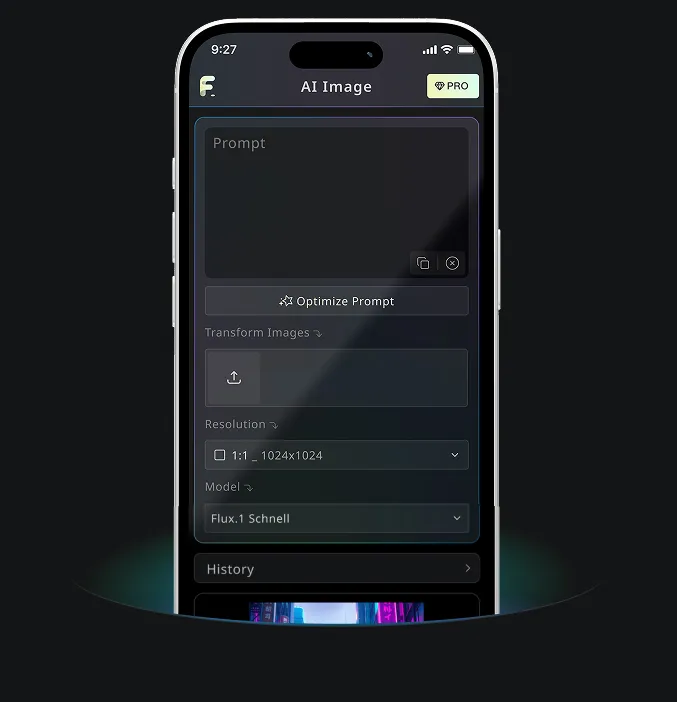
Generador texto a imagen gratis de Hailuo AI Image Generator
Formatos soportados: JPEG, JPG, WEBP, PNG
Prueba gratuita de generación de imágenes de alta calidad
Obtén una experiencia más rápida, de mayor calidad y sin anuncios generando imágenes a través de nuestro sitio web profesional
API de imagen estables y rentables recomendadas
Pasa de las pruebas gratuitas a una producción fiable con cinco API de imagen de FLAQ AI. Compara modelos estables y asequibles para generación, edición, grandes volúmenes y flujos creativos listos para producción.
GPT Image 2 API
Gran fidelidad al prompt, texto legible en las imágenes, controles de calidad flexibles y generación o edición fiable para flujos de producción.
Ver APINano Banana Pro API
Comprensión semántica impulsada por Gemini, resultados de alta fidelidad y generación de texto a imagen o edición flexible para aplicaciones exigentes.
Ver APISeedream 5.0 Pro API
Generación profesional de texto a imagen con escenas complejas, relaciones de aspecto flexibles y estilos visuales comerciales pulidos.
Ver APIQwen Image 2.0 API
Un modelo de imagen rentable de Alibaba con comprensión multilingüe de prompts, control flexible de resolución y flujos de generación escalables.
Ver APIZ Image API
Generación gestionada y asequible de texto a imagen para visuales de producto, marketing, redes sociales y automatización creativa a gran escala.
Ver APIEjemplos texto a imagen de Hailuo AI Image Generator
Mira cómo el generador de texto a imagen convierte ideas escritas en imágenes útiles, desde borradores rápidos de conceptos hasta imágenes detalladas para flujos creativos y de contenido.
Generación rápida de imágenes

Create a clean 1:1 automotive design specification board on a light gray studio background. Feature a highly detailed 1980s Volvo 240 widebody show car, JUMDOO EDITION, in warm beige satin paint with satin black accents. The car should have a boxy Volvo 240 silhouette, very low air-suspension stance, extra-wide track width, riveted wide fender flares, deep black front splitter with near-ground clearance, black side skirts, black lower cladding, black deep-dish multi-spoke wheels, stretched low-profile tires, black grille with Volvo diagonal slash, one inner front headlight covered by an X-pattern insert for an asymmetric look, shaved clean body trim, dual center exhaust, and visible racing bucket seats. Add small JUMDOO branding on the front plate area, side skirt, and rear panel. Arrange six studio render views in a 3x2 grid: front 3/4, front, side profile, rear, rear close view, and rear 3/4. Use crisp realistic 3D product-render lighting, soft shadows, black sans-serif typography, thin gray divider lines, and minimal Swiss-style layout. Include a top-left title: VOLVO 240 WIDEBODY, subheadline: JUMDOO EDITION. Add small side panels for material swatches, colorway, branding locations, wheels and fitment, and notable details.

Create a high-end minimalist Keynote-style presentation cover slide with the aesthetic of Apple's industrial design. Use a 16:9 widescreen layout. The background should have a dark matte black on the upper half and a light concrete gray platform occupying one quarter of the bottom of the screen. Place a large, realistic floating rectangular panel in the center foreground on the right side. The panel should resemble a thin black glass device or a polished obsidian platform with mirror reflection, chamfered chrome metal edges, and precise industrial finish. The panel should be suspended above the light surface and cast a soft elongated shadow below it. Add a tall vertical gray metal wall or pillar on the rightmost edge for composition. Adopt extremely simple high-end artistic guidance, leaving a lot of negative space, using film studio lighting, subtle gradients, and a clear contrast between black and silver materials. On the left side, set a clean white sans-serif font and maintain clear hierarchy: a row of tiny titles " {argument name="system label" default="Apple-inspired presentation system"} ", a row of very large bold titles " {argument name="headline text" default="Clarity At Scale"} ", and a row of medium-sized subheadings " {argument name="subtitle text" default="The strongest slides behave like products." } ". Below it, include 3 numbered principles in a vertical list with dotted lines and fine spacing: "01 | {argument name="principle 1" default="One focal object"}", "02 | Binary light / dark rhythm", and "03 | Blue only for signal". Add a short thin horizontal line above the list and a tiny blue emphasis line below it. Draw a very thin horizontal guide line running through most of the slides near the top and label the page number "01" in the upper right corner. Repeat the small title "Apple-inspired presentation system" on the light-colored surface at the bottom left. The overall appearance: luxurious technology presentation, professional product launch slides, ultra-clean Swiss grid layout, restrained single-color palette (with a subtle blue accent), and realistic rendering effects integrated into the presentation design.

Create a character growth chart based on this image. [Current Character Information] - Name: {argument name="name" default="Brankide"} - Age: {argument name="age" default="5492 years old"} - Height: {argument name="height" default="207cm"} - Occupation: {argument name="job" default="Elven Battle Commander"} - Personality: {argument name="personality" default="Cold"} Mark the height scale at the edge. Create a natural growth process, dividing it chronologically into 5 years old, early adolescence, late adolescence, twenties, and current age. Display the full body image and clearly show the height differences.
Funciones texto a imagen de Hailuo AI Image Generator
El generador gratuito de texto a imagen interpreta tu prompt, notas de estilo, detalles de escena y dirección creativa para producir imágenes claras con IA online. No se necesita experiencia en diseño ni una configuración compleja.
Análisis inteligente de texto y generación visual
La herramienta lee tu sujeto, entorno, estado de ánimo, estilo, acción y detalles, y luego convierte ese texto en una imagen que coincide con tu intención.
Generación compatible con múltiples modelos
Admite generación práctica de imágenes basada en prompts para estilos que van desde ilustraciones y arte conceptual hasta escenas realistas, visuales de producto y publicaciones sociales.
Generación instantánea y experiencia gratuita
Introduce tu prompt de texto y haz clic en el botón Generar. La herramienta crea una imagen en segundos sin registro, sin colas de espera ni configuraciones complejas.
Editable y con privacidad protegida
Descarga imágenes terminadas, genera más variaciones o refina tu prompt para otro intento manteniendo el flujo simple y respetuoso con la privacidad.
Casos de uso texto a imagen de Hailuo AI Image Generator
El generador gratuito de texto a imagen ayuda con arte digital, recursos de ecommerce, publicaciones sociales, visuales de marca y materiales educativos. Convierte texto simple en imágenes cuando necesites conceptos, borradores o ideas visuales listas para publicar rápidamente.
Arte digital y diseño conceptual
Artistas y diseñadores pueden bocetar ilustraciones, arte conceptual, imágenes de ambiente y estudios visuales a partir de descripciones simples.
E-commerce y creación de recursos publicitarios
Equipos de marketing y ecommerce pueden convertir descripciones de producto o ideas de campaña en conceptos visuales, gráficos promocionales y borradores listos para anuncios.
Redes sociales y gestión de contenido
Los equipos sociales pueden crear imágenes para publicaciones, portadas, ilustraciones temáticas y visuales de campaña que ayuden al contenido a destacar en feeds saturados.
Apoyo educativo y para presentaciones
Docentes, presentadores y creadores pueden convertir ideas de lecciones o conceptos abstractos en apoyos visuales para una comunicación más clara.
Cómo usar el generador texto a imagen de Hailuo AI Image Generator
Describe tu idea, genera una imagen y refina el resultado en un flujo simple de texto a imagen.
Introduce tu prompt
Escribe lo que quieres ver, incluyendo el sujeto, la escena, el estilo, la iluminación, los colores o el ambiente.
Haz clic en Generar
Selecciona la proporción de salida cuando esté disponible y luego haz clic en Generar para que la IA convierta tu prompt en una imagen.
Descargar o generar más
Guarda la imagen terminada, ajusta tu prompt o genera versiones adicionales a partir de la misma idea.
App Hailuo AI Image Generator para GPT Image 2 y creación de imágenes IA
Usa Hailuo AI Image Generator para crear imágenes con GPT Image 2 gratis online y continúa tu flujo en escritorio o móvil.